Skip to content

Shipping ClipBuddy 2.9 · Building AI surfaces at Tracxn

Akash Surve

I build the parts of a product people actually touch — search surfaces, editors, chat docks, upload pipelines — and I ship them all the way to real users.

Full Stack Engineer

Bangalore, India

01

Selected work

Two things worth reading in full: a product I ship alone, and the platform work I do every day.

Product · Solo

ClipBuddy

A native macOS clipboard manager, on the Mac App Store

2025 — now

Everything you copy, kept locally and searchable in a keystroke. A menu-bar app in Swift and SwiftUI over a local SQLite store with full-text search, a picker drawer on a global hotkey, and no account anywhere in the product. I designed it, built it, shipped it, wrote the marketing site, and run the releases.

MAS
sole distribution channel
2.9.x
shipped release line
16
localizations
0
bytes of clipboard data sent
SwiftSwiftUIAppKitSQLite / FTS5StoreKit 2Apple VisionAstroCloudflare Workers

Designed, built, shipped and supported solo — app, marketing site, store listing and release pipeline.
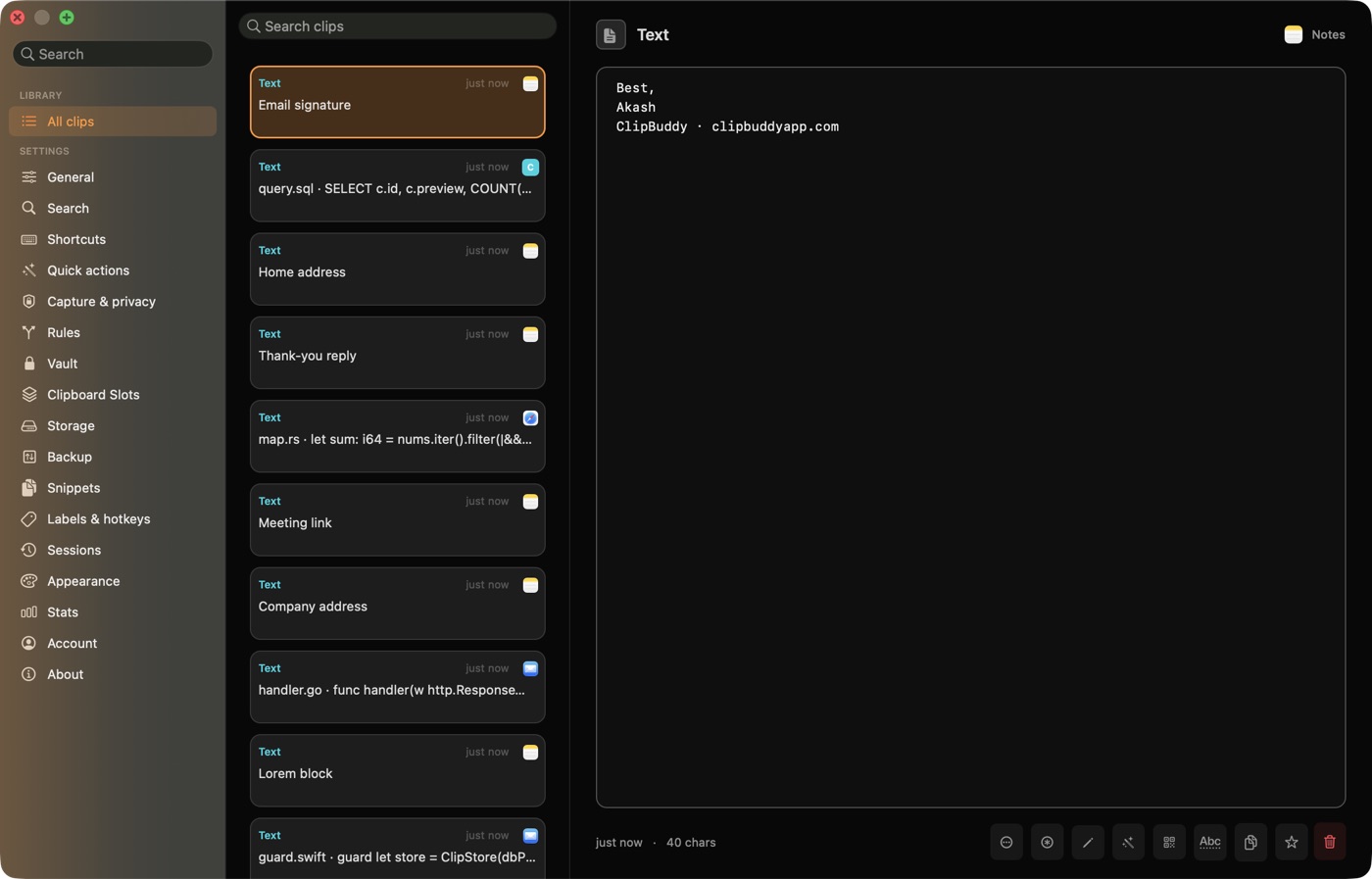
Clipboard history, filtered by type and label

The constraint that shaped everything

A clipboard manager sees every password, every API key, every private message you copy. That makes trust the whole product, and trust you can only assert is worth nothing. So the privacy claim had to be structural: no account system, no server, no sync path — nothing to leak because there is nowhere for data to go. Every feature since has had to fit inside that constraint, and several obvious ones were cut because they did not.

  1. Local-first storage that stays fast at 20,000 clips

    History lives in a single SQLite database in the app's container, with an FTS5 virtual table for search and image blobs on disk beside it rather than in the row. Search stays instant because the index does the work, not a scan.

    • FTS5 full-text index over clip contents, kept in sync on write
    • Images stored as files, referenced by id — the database stays small
    • A schema migration ledger so a database written by any past version opens correctly
    • Probe connections opened read-write, after a WAL-mode bug proved a read-only probe silently reports 'no version'
  2. Entitlement with no account system

    Free tier is the last ten clips plus the emoji picker; Pro unlocks history, search, snippets and labels. There is no login, no licence key, no backend to check against — StoreKit is the only authority.

    • A single access object reads Apple's on-device entitlements and fails closed
    • Every surface observes it, so there is one place to be wrong instead of forty
    • Monthly, annual and lifetime products, prices always read from StoreKit so they are region-correct
    • No server means no outage can lock a paying user out of their own clipboard
  3. A picker that has to be faster than not using it

    The drawer opens on a global hotkey, filters as you type, and puts the chosen clip on the pasteboard. Anything slower than reaching for the original window makes the app pointless, so the interaction budget is measured in frames.

    • Configurable picker hotkey, with registration failures surfaced instead of failing silently
    • Type-to-search across the whole history, not just the visible page
    • Opt-in direct paste behind a compile flag — Accessibility is requested only when a user enables it, never at launch
    • Labels with their own hotkeys, so a frequent set is one chord away
  4. Release engineering, because there is nobody else

    Solo shipping means the process has to catch what a second reviewer would. Most of the tooling in the repo exists because a specific bug got through once and is not allowed to again.

    • One reproducible App Store build script — compiling is not packaging, and the script enforces that
    • Source gates wired into the build that fail on known-bad patterns, added after a modal-dispatch bug froze the app invisibly
    • A manual pass checklist per release covering every surface a change can touch
    • Version discipline across the plist, the tag and the store listing, so a rejected build can be re-uploaded without ambiguity
  5. The native surface area nobody sees until it is missing

    The long tail is most of the work in a Mac app: system integrations, appearance, localisation, and the dozens of small affordances that separate a native app from a cross-platform shell.

    • OCR through Apple Vision — a screenshot becomes searchable by the words inside it
    • Translation through Apple's on-device Translation framework
    • Snippets with expansion keywords, quick actions for QR, colour swatches and calculations
    • 16 localisations, light and dark themes, backup and restore

Also shipped

  • Marketing site rebuilt from a React SPA to Astro static output, served through a Cloudflare Worker
  • Migrated off direct distribution — Sparkle updater, Ed25519 licensing and payment integration all removed for a store-only build
  • Privacy policy written to disclose the one outbound request the app makes: a daily version check carrying only the public store id
  • Press kit, App Store screenshots and store copy produced in-house
Work · Tracxn

AI surfaces & platform work

Product engineering across a large React portal and its Node services

2023 — now

I ship user-facing features end to end on a global market-intelligence platform used by investors, corporates and financial institutions: React in the portal, Node services, AWS Lambda functions and batch jobs behind it, usually in the same change. The last year has been mostly LLM work — an agentic documentation assistant, an internal MCP server, and chat surfaces embedded in pages people already use.

4×
faster server-side PDF generation
3
LLM providers behind one interface
E2E
UI, API and batch jobs in one change
3.5y
on the same product surface
ReactReduxTypeScriptNode.jsMongoDBWebSocketsLLM APIsRAGMCPAWS Lambda

Feature work described at capability level — implementation details and internal systems stay internal.

Working inside a product that is already load-bearing

Nothing here was built on a blank page. Every feature had to land inside a portal customers already use daily, alongside existing layouts, permission tiers and data contracts — which means most of the engineering is in the seams: what loads first, what is cached, what happens on a tablet, and what the page does while it waits.

  1. An agentic documentation and research assistant

    A multi-provider LLM agent answering questions against the product's own documentation and data. It picks tools rather than following a script: retrieval over the docs, web search, or a call into the platform's own search and feature APIs, depending on what the question needs.

    • Multi-provider — Claude, GPT and Gemini behind one interface, so a model choice is configuration rather than a rewrite
    • Retrieval-augmented answers with agentic tool-calling, streamed token by token
    • Intent detection routes a question to the right tool before spending a model call on it
    • Prompt caching and versioning: the cached prefix is the difference between viable and expensive at this volume
    • Answers export to DOCX, Excel and PDF, because the people asking need to send the result onward
  2. An internal MCP server for API migration

    Model Context Protocol server exposing eight read-only tools over the migration surface, so an AI assistant can answer migration questions directly instead of an engineer reading release notes by hand.

    • Schema-field validation, fuzzy field matching and endpoint comparison across API versions
    • Read-only by design — the blast radius of a wrong answer is a wrong answer, not a wrong write
    • Cut manual API-migration effort across the engineering team
  3. An AI assistant embedded in the pages it talks about

    Rather than a separate chat destination, the assistant lives as a dock on the pages users are already reading — list views and entity detail pages — so the conversation starts with context instead of asking for it.

    • Entity-scoped detail-page chat: the conversation knows which company or record you are looking at
    • List-page refine bar with an expanded composer and a bottom-up flyout
    • Both surfaces folded onto a single cached embed instead of two, so opening the second dock costs nothing
    • Dock gated on content load, shrink-on-scroll, and a reading column capped for legibility
  4. Rollout as a first-class problem

    Access to the assistant is governed by account tier, and each tier came online separately. That meant the same surface had to be exposed, gated and verified repeatedly without regressing the tiers already live.

    • Assistant access wired up tier by tier across portal, services and the external embed
    • Feature gating that waits for route and status config to load, instead of flashing the wrong menu
    • Out-of-credit handling: usage popper, reset date, and a takeover state kept in sync with the chat
    • Click and conversation ids attached to chat logs so behaviour could be measured, not guessed
  5. A documentation content manager, editor to published page

    An internal CMS for the developer documentation, covering authoring, preview, structure and search — plus the OpenAPI surfaces the docs are generated from.

    • MDX editor with live preview and a full-page preview mode
    • Nested resource tree up to ten levels, with inherited access badges
    • Deterministic search paging, so results do not reshuffle between pages
    • Frontmatter parsing fixed to stop silently dropping pages whose values wrapped onto a second line
    • API navigation grouped by domain, with nested resource levels preserved in the sidebar
  6. Real-time save-to-drive

    Sending a document to a connected drive used to be a request you waited on. It is now fire-and-forget on the server with live progress on the client, built so a second provider is configuration rather than a fork.

    • Async pipeline that returns immediately and reports progress over a socket
    • A storage adapter framework so new drive providers plug into one flow
    • Front-end store split into connection state and availability state, with availability cached
    • Selectors guarded so pages render correctly when the storage reducer is not mounted
  7. Migrations and platform work with the product live

    A share of the work is not a feature at all: moving consumers onto current API versions, retiring dead code paths, and keeping shared libraries current — always incrementally, never behind a freeze.

    • Saved-search consumers moved from a legacy API version to the current one across portal features and batch jobs
    • Feed cards and applicant flows migrated between major API versions
    • A decommissioned email-thread-linking backend removed from both the service and its front-end callers
    • Internal library versions bumped across job-system jobs and Lambda runtimes

Also shipped

  • CRM connectors for Salesforce, HubSpot and Zoho — syncing entity data and driving deal, lead and account workflows, with a board view and pipeline UI
  • A Gmail add-on putting platform data and exported documents inside the user's mail workflow
  • Server-side PDF generation made 4× faster on Lambda with Puppeteer, through parallel rendering and profiling
  • Serverless infrastructure: a CloudFront invalidation handler and a Lambda authorizer for protected assets
  • Role-based access control and feature gating across the product
  • A compare tool for evaluating entities side by side, and a user-preferences module for personalised dashboards
  • Reusable UI component libraries, with lazy loading, code splitting and memoisation to cut bundle size
  • Home dashboard widgets, global search fixes, and tablet layouts for the dashboard and assistant docks
02

About

Mechanical engineering degree, a MERN bootcamp, then four years shipping product software.

I came to software from mechanical engineering, which is a useful accident: I was taught to think about tolerances, failure modes and the difference between a thing that works and a thing that keeps working. Most of what I do now is that, applied to interfaces.

I like the work that sits between disciplines — the feature that needs a UI decision, an API change and a migration in the same pull request. Shipping ClipBuddy alone forced me to get comfortable with every part of that chain, from a SQLite schema to App Store review.

The interesting part of a feature is never the happy path — it is what the interface does while it waits, fails, or gets resized.

How I work

Ship it, then find out
A feature nobody has used is a guess. I would rather put a narrow version in front of real users and learn what is actually wrong than polish a wide one in private.
The edge cases are the feature
Loading, empty, failed, offline, mid-migration, 320px wide. The happy path is usually an afternoon; everything around it is the job, and it is what separates a demo from a product.
Make the guarantee structural
If a promise can be broken by someone editing a file, it is not a guarantee. I prefer constraints the architecture enforces — no sync path, one access authority, a build that fails on a known-bad pattern.
Leave the codebase legible
Someone reads this next, possibly me in a year. Small surfaces, honest names, and a comment where the reason is not obvious from the code.

Toolkit

Languages

  • TypeScript
  • JavaScript
  • Swift
  • Java
  • SQL

Front end

  • React
  • Redux
  • Tailwind CSS
  • SwiftUI
  • Astro
  • Vite

Back end

  • Node.js
  • Express
  • MongoDB
  • SQLite
  • WebSockets
  • REST

Platform

  • AWS Lambda
  • Cloudflare Workers
  • Git
  • CI gates
  • StoreKit

AI

  • LLM APIs
  • RAG
  • Tool-calling agents
  • MCP
  • Prompt caching
03

Path

From mechanical engineering to shipping software full time.

  1. 2023 — Present

    · Work

    Full Stack Engineer — Tracxn

    Product engineering on the private-market intelligence platform: AI assistant surfaces, documentation tooling, real-time upload pipelines and API migrations, across a React portal and Node services.

  2. 2025 — Present

    · Product

    Founder & sole engineer — ClipBuddy

    A native macOS clipboard manager on the Mac App Store. Swift app, Astro marketing site, Cloudflare Worker, and the whole release pipeline.

  3. 2022

    · Education

    Full Stack Web Development — Masai School

    Full-time MERN program. Awarded The Power Project, The Founder's Circle and the Rising Star award for project work and consistency.

  4. 2019 — 2022

    · Education

    B.E. Mechanical Engineering — Savitribai Phule Pune University

    Preceded by a Diploma in Mechanical Engineering, MSBTE, 2016 — 2019.

04

Working together

What an engagement looks like from your side, and the public trail behind the claims above.

  1. 01

    A short, specific conversation

    One email or a half-hour call. What you are building, what is already there, what done looks like, and when you need it. I would rather say no here than three weeks in, so expect direct questions about scope.

  2. 02

    A written scope and a fixed price

    You get the work broken into deliverables, what is explicitly out of scope, a timeline, and a price. Fixed where the shape is clear, hourly where it genuinely is not. Nothing starts until you have agreed to that document.

  3. 03

    Visible progress, not status meetings

    Work lands in small reviewable pieces on a branch you can see, with a written update at the end of each week: what shipped, what is next, anything that changed. You can always look at the actual state rather than a summary of it.

  4. 04

    Handover you can actually maintain

    Code that reads like the rest of your codebase, a README that covers running and deploying it, and the reasoning behind anything non-obvious written down. For App Store work that includes the listing, the release script and the submission itself.

Check the work

  • GitHub

    Open source and the repositories behind the work above

  • Hashnode

    Writing on things I have had to work out the hard way

  • Stack Overflow

    Answers, mostly JavaScript and React

  • LeetCode

    Data structures and algorithms practice

05

Freelance FAQ

What people ask before the first email — availability, scope, rates, timezones.

Are you available for freelance work?
Yes. I take on a small number of freelance and contract projects alongside my full-time engineering role, which keeps the list short and the commitments realistic. Email me with what you are building and when you need it and I will tell you honestly whether I am the right fit — including when I am not.
What kind of projects do you take on?
Five kinds: native macOS apps in Swift and SwiftUI, including App Store submission; React and TypeScript front ends such as dashboards, editors and search interfaces; Node.js services, REST APIs and real-time pipelines; LLM features — retrieval-augmented assistants, tool-calling agents and MCP servers wired into a real product; and rescue work on an existing build that is slow, broken on mobile, or stuck one step from shipping.
How do you charge and how do engagements work?
Either a fixed scope with a fixed price, or ongoing hours for work that cannot be specified up front. Fixed scope suits a defined deliverable — an app submission, a redesign, a specific feature. Hourly suits open-ended work. I quote after a short conversation about scope, never before.
Where are you based and which timezones do you work with?
Bangalore, India, on IST (UTC+5:30). That overlaps a full working day with Europe and the UK, and mornings there are afternoons in Australia and Asia. For US clients I keep a fixed overlap window rather than pretending to be online at 3am — async written updates carry the rest.
Can you take a macOS app from idea to the Mac App Store?
Yes — that is exactly what ClipBuddy is. Swift and SwiftUI app, local SQLite storage, StoreKit subscriptions and lifetime purchase, the marketing site, App Store listing, screenshots, privacy policy and the release pipeline. Apple review is usually the part people underestimate, and I have been through it repeatedly.
Do you work on existing codebases or only new builds?
Both, and most of my day job is the former. At Tracxn I ship features into a large React portal and its Node services that customers use daily — which means working inside existing layouts, permission models and data contracts without breaking what already works. Joining an existing codebase is normal, not an exception.
What is your stack?
TypeScript and JavaScript, Swift, and SQL day to day. Claude, GPT and Gemini APIs with RAG, tool-calling and MCP for the AI work. React, Redux, Tailwind CSS, SwiftUI, Astro and Vite on the front end. Node.js, Express, MongoDB, SQLite and WebSockets on the back end. AWS Lambda and Cloudflare Workers for deployment, plus StoreKit and the Apple frameworks for macOS.
How quickly do you reply?
Usually within a day. The fastest route is email — surveakash01@gmail.com — with a sentence on what you are building, what you need help with, and a rough timeline and budget. That is enough for me to give you a real answer instead of a discovery call.
06 — Contact

Taking on select freelance work · usually replies within a day

Let's build something.

I'm open to freelance and contract work alongside my full-time role — macOS apps, React front ends, Node services, or getting something unfinished across the line. Tell me what you're building and roughly when you need it, and I'll tell you honestly whether I'm the right fit.

What I take on

  • macOS apps

    Native Swift and SwiftUI — menu-bar utilities, local-first storage, StoreKit, and the App Store submission that usually turns out to be the hard part.

  • React front ends

    Product surfaces in React and TypeScript: dashboards, editors, search and filter UIs, and the interaction detail that makes them feel finished.

  • Node services & APIs

    REST services, real-time pipelines over WebSockets, batch jobs, and incremental migrations done without taking the product down.

  • LLM features

    Retrieval-augmented assistants, tool-calling agents and MCP servers wired into a real product — including the streaming, caching and cost work that decides whether they survive contact with production.

  • Rescue & polish

    An existing build that is slow, broken on mobile, or stuck one step from shipping. Often the fastest thing I can do for someone.

Based in Bangalore, India, working with teams in any timezone. Fixed-scope projects or ongoing hours — whichever fits what you're building.